![BCS_Logo_Horizontal_Reverse_CMYK - Copy-1.png]](https://help.getbcs.com/hs-fs/hubfs/BCS_Logo_Horizontal_Reverse_CMYK%20-%20Copy-1.png?height=40&name=BCS_Logo_Horizontal_Reverse_CMYK%20-%20Copy-1.png)
After more than a year of work, we're introducing the RiskBot Review Agent: AI that reviews every certificate, endorsement, and policy page you collect, shows you the evidence behind every answer, and closes the loop entirely. Your team will never need to review a document again.
🧠 Why it's different
Most "AI-powered" tools hand a document to a general-purpose model, get a best guess back, and ask you to double-check it. That's what "human in the loop" usually means: the AI isn't accurate enough to trust, so the last mile falls on you.
RiskBot uses the same frontier models, wrapped in a harness built from 18 years of insurance-tracking experience:
- Contract standard – your requirements, per client
- AI guidance – how insurance documents actually behave: what to check, hints, never-accept rules
- Analyst rulings – edge cases our team has resolved become permanent rules
- Evidence weighting – multiple evidence points per criterion, calibrated into a confidence score
- Cited evidence – exactly where on the document each answer came from, for a full audit trail
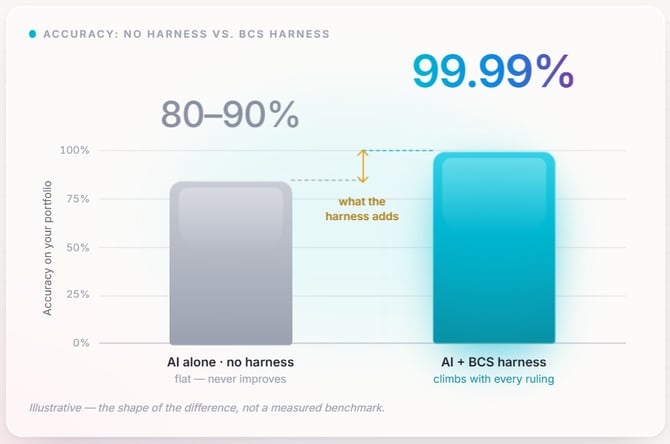
The result: review accuracy goes from roughly 80% with a model alone to 99.999%. No document will ever need a manual review from you.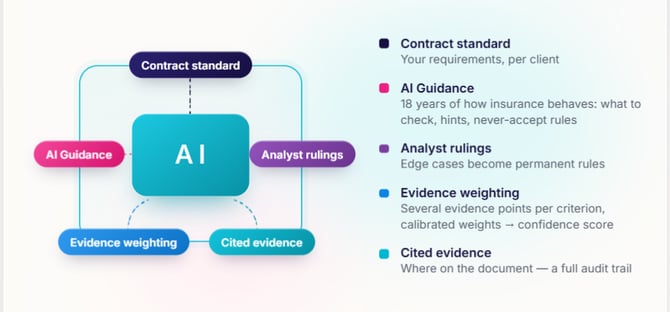
📄 What RiskBot can now review
- Any certificate of insurance, in any format – not just ACORD forms
- Every policy on the certificate, including professional, cyber, pollution, and anything else listed
- Additional insured entities and complex language in the description of operations
- All endorsements – ISO and non-ISO, not just general liability
- Homeowners insurance policies
- Policy pages, scanned for exclusionary language in any language, from any country, even on non-standard forms (for example, New York Labor Law, subcontractor employee, height limitation, or multi-habitational exclusions)
All of it still happens in real time, with the same instant red/green feedback you're used to.
🔍 See the evidence behind every answer
Upload a document to an Insurance Assignment and RiskBot reads every page – five-page COI packets or 90+ page policies – then opens the RiskBot findings panel:
- Every field graded red or green, right on the document
- Filter to Non-Compliant or All items, grouped by policy
- Click any finding to jump straight to the highlighted evidence, with the page it was read from
- A confidence level on each answer, so you can see how certain RiskBot is
- Nothing waiting for your input – skim the findings and click Finish Review
✅ RiskBot now completes tasks for you
Your task queue holds two kinds of items: vendors submitting documents, and vendors asking questions or telling you something that needs a response. Document-only submissions make up about 70% of tasks – and since RiskBot has already reviewed the document, there's nothing left for you to do. RiskBot now closes those automatically.
Turn it on under Settings > Automation (or click Configure RiskBot automation settings on the Tasks page):
- Allow the Task Agent to auto-complete tasks for you – the master switch
- Fully compliant submissions are completed automatically – no task lands in your queue for a document that already passed
- Auto-complete even if the document is non-compliant (optional) – RiskBot finishes the review and the next step, such as the deficiency notice, runs on its own. Leave this off if you want to look at non-compliant submissions yourself, for example to grant a waiver.
RiskBot reads every inbound vendor email and clears the clutter that needs no reply:
- Automated and undeliverable: out-of-office replies, automated actions, delivery failures, system errors, spam
- "No longer needed" replies: no longer performing services, no longer occupying the space, policy cancelled, coverage moved to another agent, no owned autos
- Routine acknowledgments and follow-ups
It never auto-completes contact-info changes, questions, clarifications or waiver requests, emails you sent yourself, or anything it can't classify with confidence – those always go to you.
The result: roughly 70% of your tasks close on their own, and what's left in your queue is only the items that need a person. The Tasks page shows how much RiskBot has completed, and you can view everything it auto-completed.
🎚️ Choose your level
The RiskBot Review Agent is an add-on to your Professional or Enterprise plan, billed per active account per month on top of your plan rate:
| Level | Add-on | What RiskBot reviews automatically |
|---|---|---|
| Core | Included | AM Best rating lookup; COIs for GL, auto, workers' comp, umbrella/excess, and property; additional insured entities in the description of operations |
| Plus | +$0.75 | Everything in Core, plus any policy on the COI, complex description-of-operations language, and task automation |
| Super | +$1.25 | Everything in Plus, plus all endorsements and homeowners policies |
| Ultra | +$3.00 | Everything in Super, plus exclusionary language in policy pages – any language, any country, any form |
Any criterion can still be set as a requirement at any level. If your level doesn't cover it, RiskBot simply won't review it automatically.
💼 Updated plans
- Professional now starts at $0.70 per account per month (down from $1.50), with volume pricing as low as $0.19.
- Enterprise (Professional + 15%) adds centralized exception review requests, single sign-on (SAML/OIDC), integrations, and enterprise support.
Already a customer? Your current plan never changes and your grandfathered features stay put. To use RiskBot task automation or the expanded review coverage, pick the plan and level that fit, and you'll move to the new plan.
Questions? Email customersupport@getbcs.com or reach out to your Customer Success rep.